
Create and Attach a Rubric
Many instructors use rubrics to set out assessment goals and streamline feedback. Brightspace offers the opportunity to create and affix rubrics to both Assignments and Discussions. You can use this tool to select pre-determined categories and to offer written, audio or video feedback within them.
There are two types of rubrics available for use:
- Holistic Rubrics – Single criterion rubrics (one-dimensional) used to assess participants’ overall achievement on an activity or item based on predefined achievement levels. Holistic rubrics may use a percentage or text only scoring method.
- Analytic Rubrics – Two-dimensional rubrics with levels of achievement as columns and assessment criteria as rows. Allows you to assess participants’ achievements based on multiple criteria using a single rubric. You can assign different weights (value) to different criteria and include an overall achievement by totaling the criteria. With analytic rubrics, levels of achievement display in columns and your assessment criteria display in rows. Analytic rubrics may use a points, custom points, or text only scoring method. Points and custom points analytic rubrics may use both text and points to assess performance; with custom points, each criterion may be worth a different number of points. For both points and custom points an overall score is provided based on the total number of points achieved. The overall score determines whether the activity is achieved.
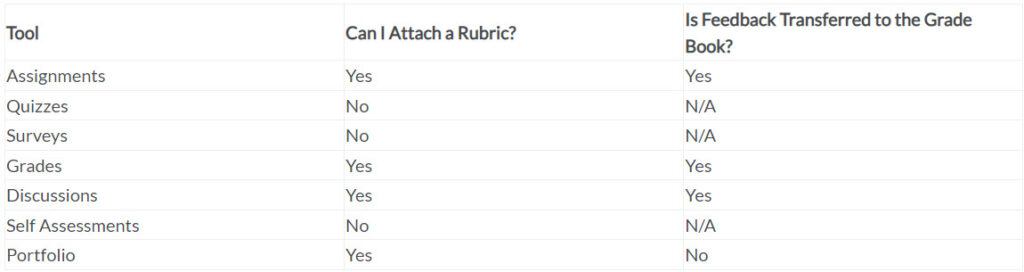
Below is a chart of where rubrics can and cannot be attached in Brightspace.
Easily Create and Use the Rubrics Tool in Brightspace
Below are links to videos showing how to create a holistic rubric, an analytic rubric, and a weighted rubric in Brightspace.
- Create a Weighted Rubric
- Create a Holistic Rubric
- Create an Analytic Rubric